


If your prices depend on volume, configuration or the agreement you have with a particular account, a shopping cart is the wrong front door.
Your buyer's job is to find the right SKU, compare specifications and send an inquiry your sales team can quote on. That is a different type of website from an online store, and it is built differently.
When a catalog website is the right choice, and when you need an online store
Replacing Add to Cart with Request a Quote is a deliberate pattern, not a missing feature. It matches the way B2B already sells: the buyer finds the product, you confirm the specification, price the volume and issue the invoice. In that process a cart is a button nobody presses — and one you keep paying to maintain.
A catalog website is the right call if
- Your price depends on volume, configuration or a negotiated agreement. You cannot publish a number and say "buy now" — it has to be quoted.
- A salesperson closes the deal: a call, a quote, an invoice.
- You have many SKUs — 50, 300, 2,000 — and comparatively few transactions. A cart and online payments add 20–30% to the price and one to two weeks to the build. If you take payment every few days, that checkout will never pay for itself.
- You want buyers to find the right item through filters and faceted search instead of scrolling a PDF price list.
- You sell wholesale or B2B, where every account has its own terms.
A catalog website is the wrong call if
- Your customer has to place the order and pay online without talking to anyone. Then you need an online store — WooCommerce or OpenCart, depending on the size of your range — 20–30% more expensive, with the cart and the payments already built, and no rebuild a year from now.
- You have fewer than 20 products and sell in conversation anyway. A brochure website is cheaper and gives you a page per product line, without a category structure.
- You plan to move to online payments within a few months and want it designed in now. Then we price the store today: converting a catalog into a store costs close to a new build, because checkout and payments are designed from the start rather than bolted on top.
If none of these describes you, write to us and we will go through your case before quoting anything.
What you get at launch
All of it stays with you after acceptance.
- A working catalog on your domain and your hosting. The access is yours from day one.
- An admin panel where you add products and change prices and descriptions yourself. No developer call and no invoice for a comma.
- A category taxonomy built around your range, not a stock template your products get forced into.
- Product pages with filters by specification: size, color, material, configuration — whatever your range actually has.
- Search and sorting that hold up at your number of SKUs instead of crawling at three hundred.
- A Request a Quote form on every product page. The buyer leaves their details while looking at the product, rather than hunting for your Contact page. Inquiries can go to your inbox or straight into your CRM — that affects the price, so we settle it at the structure stage.
- A mobile version tested by hand: find, compare, send an inquiry.
- Design files in Figma. They are yours, and any other agency can pick them up.
- Training for your team, and a recording of that training.
- A 30-day warranty after acceptance.
Every category page is a landing page of its own
The common failure in catalogs built in a hurry: every category runs on one template with nothing but the name changed. Google sees identical pages and cannot tell which one to rank for which query.
We are a marketing agency, so we design categories around specific search queries: their own heading structure, their own copy, their own answers to the questions a buyer asks at that point. When you start running ads or working on search, there is somewhere to send the traffic — the categories are already built to receive it, not just to display products to people who knew where they were going.
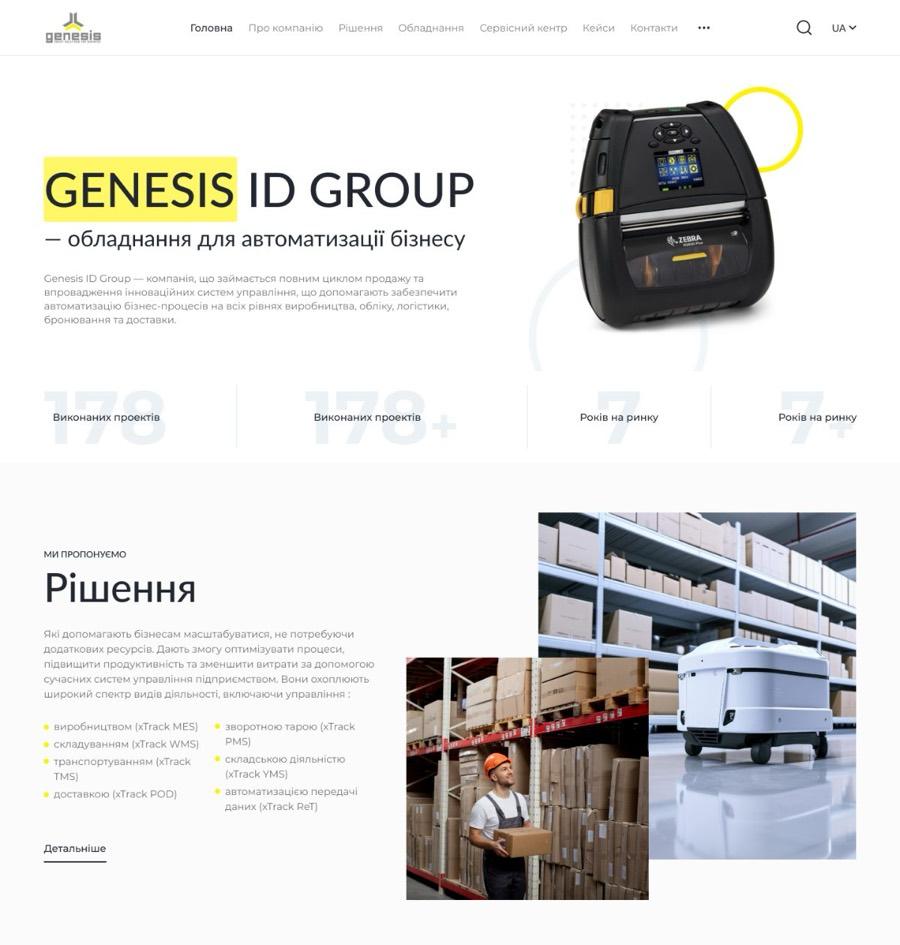
That is how the Genesis ID Group catalog is built — warehouse and logistics automation equipment. Categories there are organized around specific queries and by vendor, so each one works as a landing page rather than an entry in a long product list.
Working with us from the US, the UK or the EU
Four questions come up in the first call every time. Here are the answers before you ask.
Who owns the code
You do. On acceptance, all rights to the code, the design files and the administrator access transfer to you. There is no license fee, no hosting lock-in and no component you keep paying us for. The only case where we keep access is when you stay with us for ongoing support and want us to run the site. The domain and the hosting are paid for by you and registered in your name, so they are yours from day one. We build on standard WordPress, which means any agency can pick the project up after us — and your product data exports in a standard format, not into a proprietary one.
NDA and confidentiality
We sign an NDA before you send us anything sensitive — send us yours or use ours. On a catalog project that matters more than usual: your price list, your margins and your account-specific terms are the first files we ask for. Product data, price lists and customer records stay inside the project.
Time zones
We work from Lviv, one hour ahead of Berlin, Vienna and Zurich, two hours ahead of London and seven hours ahead of New York. For European clients that is the same working day. For US clients our afternoon is your morning, so a same-day answer is normal rather than lucky. We reply by email within one business day and meet on Google Meet or Zoom. Project communication is in English, in writing, with one point of contact on our side.
Contract, payment and law
Half the amount at the start, half after the work is delivered and accepted. The price and the scope are fixed in the contract and do not change after that. We invoice in US dollars.

Catalog or online store? We will tell you in 15 minutes
Leave your details and we will come back within one business day: we will go through your range and tell you which type of site you actually need and what it costs.
Packages and prices
We do not quote "by complexity" and we do not say "we will estimate after analysis". We estimate the work in hours, agree the structure with you, and then put one number in the contract. It moves only if you decide to add scope — and we show you that amount before the work starts, not after.
A catalog is priced by templates rather than by pages: the home page, a category page with filters, a product page, the inquiry flow and a content page. Five templates is the base that the starting figure is built on, and each of them takes a designer, a developer, a copywriter and an SEO specialist.
Pricing it this way gives you something to compare with. Take any other proposal you receive and ask two questions: how many hours are budgeted for your pages, and who exactly is going to work those hours. If the answer is "we will estimate after analysis", you do not yet know what you are paying for.
Three packages
- Design on a proven grid
- Category taxonomy
- A simple product page
- Basic filters and search
- An inquiry form delivered to your inbox
- Admin panel and training
- 30-day warranty
- A custom design rather than a grid-based one
- One-time product data import from Excel or CSV
- Advanced filters by specification
- Product pages with variants: size, color, configuration
- Category pages written for search queries
- Scheduled product data sync from your ERP: daily, every ten days or monthly
- Inquiries delivered into your CRM instead of your inbox
- A second language version
- Wholesale pricing and separate terms for different customer groups (B2B/B2C)
- Product comparison or a saved list
What pushes the price up
There is nothing mysterious in it. Every item below is additional hours.
Number of SKUs and categories
Up to 300 SKUs and 15 categories is the base package. Beyond that you need a deeper subcategory structure and filters that genuinely filter rather than a row of checkboxes. Over 1,000 SKUs with frequently changing prices is a conversation about an ERP feed instead of a one-time file upload.
Product data import
Two different scenarios, priced differently.
One-time import — we take your Excel or CSV file, map it onto the site structure and upload it. After that you edit prices and availability in the admin panel yourself. This is included in Standard and Advanced, with nothing to pay on top.
Scheduled sync — we build the connection between your accounting or ERP system and the site. You choose how often it runs: daily, every ten days, monthly. Prices, stock and new items appear without anyone on your team touching them. That is an integration rather than an upload: it is designed around a specific system and a specific set of fields, so it is quoted separately from the catalog.
Which one you need follows from how often your prices move. Quarterly, and automation will not pay for itself. Weekly, and manual updating costs more of your manager's time than the sync does.
Number of languages
A second language is another pass by the copywriter across every category and product page, plus a layout check: longer words push buttons and filters out of place. The cost depends on the type of site and the volume — translating a 15-category catalog and a 40-category one are different jobs. We price it together with your package.
Non-standard pricing logic
Wholesale tiers, account-specific terms, a configurator that prices a product by its specification. We quote these separately and show the hours before we start.
Whether your content is ready
The most common reason a timeline stretches. If the price list and the photography exist, we take them and work; if they do not, that is a separate job and it has to start in parallel with the design. A catalog with three hundred SKUs and three of them described is a showroom with empty shelves.
How long the build takes and what we need from you
From 12 to 35 business days depending on the package. Below is what that consists of and where it usually slips — and it is not development. Catalogs stall when the price list never arrives or nobody looks at the designs for two weeks.
| 01. | Brief and structure2–3 business days | we go through your range and your competitors and build the category taxonomy. | the price list or item list, two or three catalogs you like, and one person who makes decisions. |
|---|---|---|---|
| 02. | Wireframes2–3 business days | we lay out the page structure — category, product page, filters. | one hour-long call and feedback within 2 business days. |
| 03. | Design3–8 business days | home page, category, product page — in your brand style. | sign-off on the designs. One round of revisions is inside the timeline. |
| 04. | Build and data upload3–17 business days | we build the catalog, import the price list, configure the filters and the inquiry form. | the price list in whatever format you have — we will map it ourselves. |
| 05. | Testing1–2 business days | we walk the whole buyer path by hand: find, filter, send an inquiry. | be reachable if questions come up. |
| 06. | Launch and training1–2 business days | we move the site to the live domain, train your team, hand over the access. | the domain and the hosting. |
A catalog we built
Two more catalogs without a cart are in our portfolio: one for a window treatments manufacturer, one for a POS hardware distributor. Both are under the same pattern — an inquiry on a specific product, a salesperson closing the deal. We can walk you through either on a call.
What we build on, and why
We build catalogs on WordPress, and the main reason is search. Every category becomes a page in its own right, one that Google can rank for its own set of queries. On a catalog that is the deciding factor: buyers do not search for a company, they search for a product, and they should land in the category that holds it rather than on your home page.
We do not install a store module on top of that. Products, categories and filters run on a structure we build ourselves: a catalog without a cart has no use for an off-the-shelf store engine, and there is no sense paying for a feature set you never open.
WordPress is the most widely used platform in the world, and two further advantages follow from that — the ones people mention less often. You are not tied to us: if you want a different agency tomorrow, you will find one in a day. And the admin panel makes sense to someone without a technical background — adding a product works like writing a post.
When the catalog is no longer enough and you need a cart with payments, we build the store on OpenCart, a platform made for trade. The category structure carries over from the catalog instead of being rebuilt. If the range is small and the budget is tight, the same move can be made on WooCommerce: cheaper and faster.
When a catalog is no longer enough
- Buyers want to pay online and check out without talking to anyone — that is a move to a store, on WooCommerce or OpenCart depending on the range.
- More than a few thousand SKUs with prices that change several times a day — then we are talking about an ERP integration and a different platform.
- Complex B2B logic with multi-step approval of an order — that is closer to a platform than to a catalog.
What you will need after launch
A catalog at launch is shelving with a structure and nothing on the shelves yet. What follows is work we also do, quoted separately. We raise it now so it goes into your budget instead of arriving as a surprise on launch week.
- Populating the catalog.
- This is where the question usually lands: there are many SKUs and somebody has to enter each one — name, price, specification, image. If you have a file, we import it. If you do not, we enter them by hand and count content manager hours at $10 an hour: 50 products and 5,000 products are different jobs.
- Scheduled product data sync.
- The connection to your accounting or ERP system so prices and stock update themselves — daily, every ten days or monthly, as you choose. Included in Advanced. On Essential and Standard we quote it against your specific system.
- Copy and product photography.
- Descriptions, specifications, shoots. Yours or ours.
- Analytics.
- Google Analytics 4 with an inquiry event, so you can see which category produces inquiries and which only produces traffic. Quoted separately.
- The domain and the hosting.
- Paid for by the client, for every type of website. Registered in your name, so you stay the owner; we can select, buy and configure them.
- Promotion.
- SEO and paid search, to put people in front of the catalog. Same team that built the site: the categories are already written for queries, so nobody has to invent them twice.
- Support.
- Updates, backups, security. From $70 a month for basic support up to $500 for full coverage.
- Changes after acceptance.
- New categories, and in time a full store — on WooCommerce or OpenCart depending on the range. Billed in hours at the same rates.
The terms we work on
Ownership of the code, the NDA, time zones and the contract itself are covered in the block above. What is left is how the work is run.
- The contract states the scope, the price and the timeline. Anything not in it is quoted separately and shown to you before we start.
- Payment. 50% at the start, 50% after the work is delivered and accepted.
- A 30-day warranty from acceptance. Anything agreed in the contract that does not work correctly, we fix at no cost. Rebuilding a section or changing a design you already approved is new work and is billed separately.
- The warranty also covers mistakes that are not ours. Hosting outages, plugin conflicts after updates, and errors introduced by your own edits. We diagnose and fix without arguing about whose fault it was.
- Response time. During the warranty period we reply within one business day.
- The access is yours. Hosting, domain, admin panel, analytics — all registered in your name and handed over at acceptance. Your catalog is never held hostage.
- 13 years in business. More than 160 projects delivered.
Frequently asked questions
Who owns the code once the project is delivered?
You do. On acceptance, the rights to the code, the design files and the administrator access transfer to you, along with the domain and the hosting, which are in your name from the start. There is no license fee and no proprietary CMS. We keep access in one case only: if you stay with us for ongoing support and want us to run the site.
Do you sign an NDA?
Yes, before you send us anything sensitive. Send us your template or use ours. On a catalog project this comes up immediately, because the first thing we ask for is your price list.
What is your time zone overlap with our team?
We are in Lviv: one hour ahead of Berlin, two ahead of London, seven ahead of New York. European clients get the same working day. US East Coast clients get our afternoon as your morning. Everything is written down in English and confirmed by email, so the overlap matters less than it would with a phone-first vendor.
Is a catalog website the same as a B2B eCommerce site?
It is the same idea with the checkout removed. Buyers browse a full product range, filter by specification, open a product page and request a quote instead of adding to cart. Everything up to the quote is identical to eCommerce — category taxonomy, faceted search, product data import, product pages. What is missing is cart, payment and order management, which is exactly what you are not paying for when the deal closes through a salesperson anyway.
What if we want a cart later?
It can be added, as an online store on WooCommerce or OpenCart depending on how far the range has grown, and the category and product page structure carries over rather than being rebuilt. But it is not "switching a button on" — checkout and payments are designed separately. If you know a cart is coming within months, it is cheaper to build it in now.
How much does a catalog website cost?
From $3,300. Each package has its own fixed price and scope, and they are listed above with what is inside each one. We estimate in hours, agree the scope, and the number goes into the contract before the work starts.
How long does it take?
From 12 to 35 business days depending on the package. The stage-by-stage breakdown is in the timeline block above. The part that moves the date is usually content and approvals on your side, not development.
Who uploads the products?
By default you do — that is what the admin panel is for. If you have a price list file, we import it as part of Standard and Advanced. If there is no file and there are thousands of SKUs, we quote the upload separately in content manager hours at $10 an hour.
Where do the inquiries go?
By default to your inbox, and that is included. If they need to land in your CRM, the Advanced package already covers the integration. On Essential and Standard it is a separate item from $300, depending on the system and on the data that has to move. We settle this at the structure stage, because it affects both the price and how your sales team works.
Will the catalog rank in Google?
The technical foundation will be there: speed, mobile, correct headings, a sitemap. Categories are written for search queries as a matter of course. But positions themselves are months of separate work — that is promotion, not development. For EN-language markets we would start with outbound and paid search rather than wait on organic.
What happens when you deliver the site and leave?
We do not leave, and we do not hold on to you either. The 30-day warranty is included. After that: support from $70 a month, changes billed in hours, or running it yourself — all the access and all the design files are already yours.

